


EdgeOne Pages AI Voice Chat
End-to-end voice AI pipeline: browser audio capture, WebSocket streaming, ASR, and TTS — powered by Cloud Functions.
| Framework | Static |
| Use Case | AI,Cloud Functions |

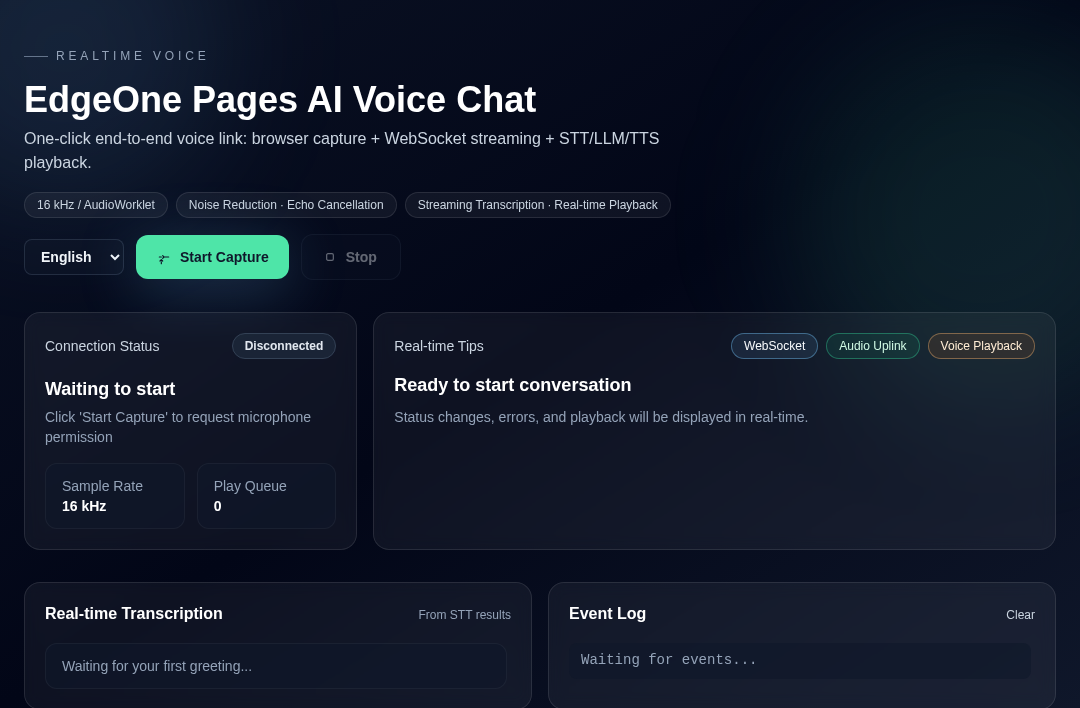
EdgeOne Pages AI Voice Chat
End-to-end voice pipeline example: Browser 48kHz capture → AudioWorklet resampling/framing → WebSocket streaming → PagesAI ASR → stable text triggers PagesAI TTS → downstream PCM playback. Designed for deployment on EdgeOne Pages (Node Functions).
Project Positioning
- An open-source template ready for EdgeOne Pages (Node Functions), delivering a browser-to-backend real-time voice loop out of the box.
- Aims to cut boilerplate for voice apps, demo WebSocket + audio best practices, and quickly extend to CS/chatbot/assistant scenarios.
Features
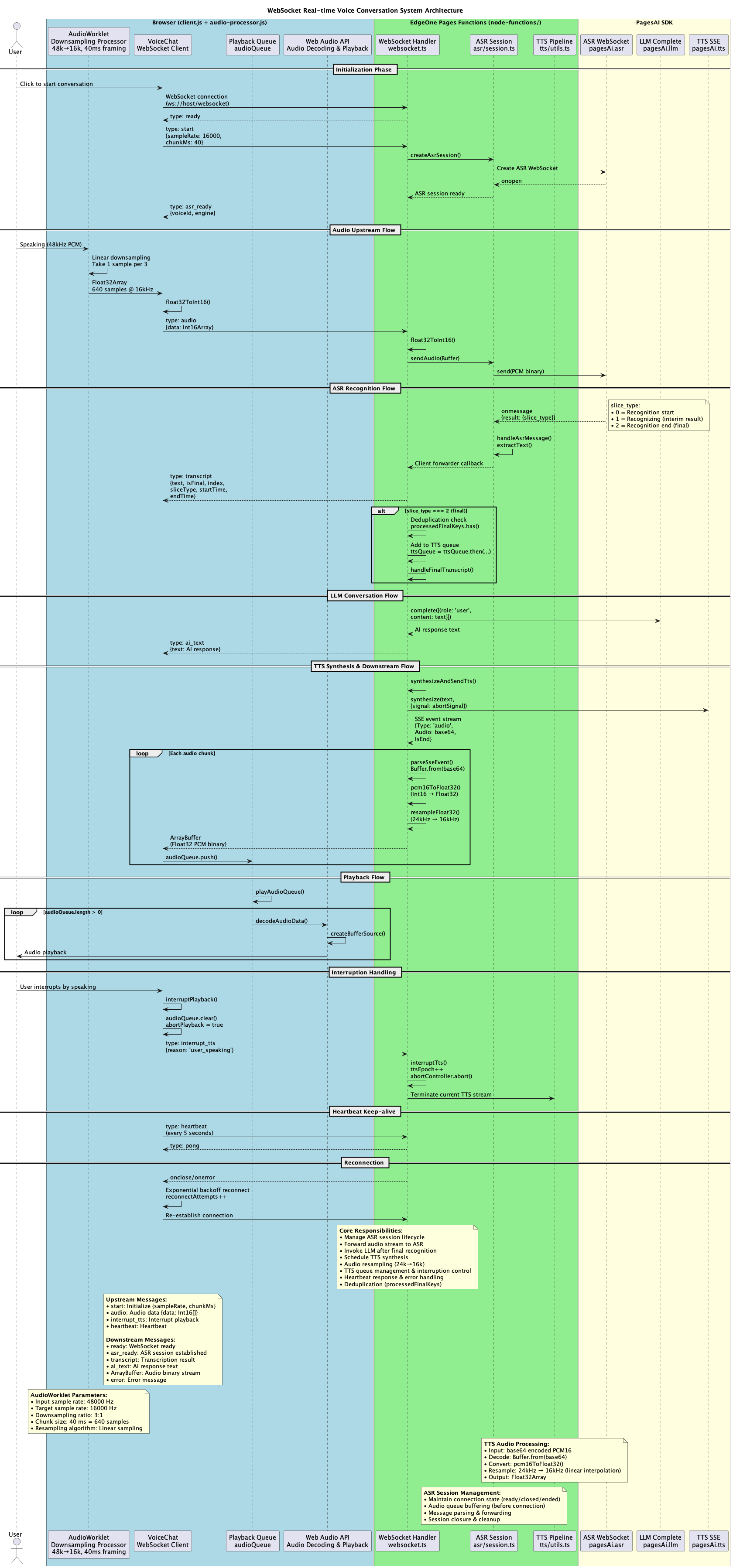
- 48 kHz microphone capture with linear downsampling to 16 kHz via AudioWorklet, pushed in fixed 40 ms frames to reduce WebSocket frame count.
- Voice Activity Detection (VAD): Dual-window detection mechanism (200ms interrupt sensitivity, 400ms stability window) automatically interrupts TTS playback when user speaks.
- Adaptive Noise Reduction: Real-time noise floor estimation, spectral subtraction, and soft noise gating for cleaner audio input.
- Bidirectional WebSocket protocol:
start/audio/interrupt/interrupt_tts/heartbeatrequests,ready/asr_ready/transcript/ai_textand binary audio responses. - PagesAI pipeline: ASR WebSocket for real-time transcription; stable text is chained with PagesAI TTS, server resamples to client sample rate before downstream transmission.
- LLM-generated replies: Stable transcription text is sent to a large model service, then synthesized via TTS, forming a hear-think-reply loop.
- Intelligent playback scheduling: Pre-scheduled audio buffering with batch scheduling to eliminate playback gaps and enable smooth interruption.
- Auto-reconnection: Exponential backoff reconnection strategy (max 10s delay) with silent recovery to maintain seamless user experience.
- Real-time UI: Client maintains Float32 playback queue, keepalive heartbeat, live transcription panel with timing metadata.
Architecture
Flow: Browser AudioWorklet produces 16 kHz/40 ms PCM → WebSocket /websocket → Server establishes ASR session and forwards audio → ASR callback transcription → final segment triggers TTS SSE → Server resamples TTS audio and sends binary downstream → Client queue playback.
Directory Structure
.
├── index.html                 # UI, static entry point
├── client.js                  # Frontend logic: capture, WS protocol, playback queue and UI
├── audio-processor.js         # AudioWorklet: 48k -> 16k, 40ms framing
├── node-functions/
│   ├── websocket.ts           # Main WS handler: ASR forwarding + LLM + TTS chain
│   ├── asr/                   # ASR WebSocket wrapper
│   ├── tts/                   # TTS wrapper and resampling
│   ├── types/                 # PagesAI runtime type declarations
│   └── utils/                 # WS helpers and audio utilities
Running and Deployment
Runtime Requirements
- Node 18+ (EdgeOne Pages Node Functions default), with built-in
Buffer/crypto/ws. - Browser with AudioWorklet and
getUserMediasupport.
Environment Variables
PAGES_AI runtime (required)
PAGES_API_TOKEN: issuedapi_token. You can obtain your API Token from:
Global Object
PagesAI: new ({ apiToken }) => PagesAIShapeasr: AsrBindingllm: LlmBindingtts: TtsBinding
Provide this environment variable before usage:
PAGES_API_TOKEN: issuedapi_token. Get your API Token from EdgeOne Pages API Token documentation Access it fromcontext.envinside Node Functions handlers.
ASR (streaming speech recognition)
interface AsrBinding {
  createSocket(): Promise<{
    socket: WebSocket; // signed WS connection, ready to send()
    engineModelType: string;
    voiceId: string;
  }>;
}
Usage example (token comes from context.env in your handler):
// context is provided by the Node Functions runtime
const ai = new PagesAI({ apiToken: context.env.PAGES_API_TOKEN! });
const { socket } = await ai.asr.createSocket();

// send audio binary (PCM/Buffer)
socket.send(pcmBuffer);

// listen to recognition result
socket.on('message', (data) => {
  try {
    const msg = JSON.parse(data.toString());
    if (msg.type === 'transcript') {
      // msg.text, msg.isFinal, etc.
      console.log('ASR transcript:', msg.text, msg.isFinal);
    }
  } catch {
    // ignore non-JSON
  }
});

// end stream
socket.send(JSON.stringify({ type: 'end' }));
LLM (chat completion)
type ChatMessage = { role: 'system' | 'user' | 'assistant'; content: string };

interface LlmBinding {
  complete(messages: ChatMessage[]): Promise<string>;
}
Usage example (token from context.env):
const messages = [
  { role: 'system', content: 'You are a concise assistant' },
  { role: 'user', content: 'Hello' },
];
const ai = new PagesAI({ apiToken: context.env.PAGES_API_TOKEN! });
const answer: string = await ai.llm.complete(messages);
// answer: "Hello!"
TTS (text-to-speech)
interface TtsSynthesizeOptions {
  signal?: AbortSignal;
}

interface TtsBinding {
  synthesize(
    text: string,
    options?: TtsSynthesizeOptions
  ): Promise<Array<{ data: string }>>;
}
Usage example (token from context.env):
const ai = new PagesAI({ apiToken: context.env.PAGES_API_TOKEN! });
const events = await ai.tts.synthesize('Hello');
for (const e of events) {
  // e.data is SSE data string; parse manually (see tts/utils.ts)
}
Audio and Pipeline Parameters
Capture Configuration
- Sample Rate: 48 kHz native capture, downsampled to 16 kHz
- Format: Mono, Float32 → Int16 PCM conversion
- Frame Size: 40 ms fixed chunks (640 samples @ 16 kHz)
- Browser Features: Echo cancellation, noise suppression, auto gain control enabled
VAD & Noise Reduction
- VAD Threshold: 0.01 (configurable volume threshold)
- Interrupt Sensitivity: 200 ms window for fast user speech detection
- Stability Window: 400 ms window for voice end detection
- Noise Gate: 0.005 threshold with adaptive noise floor estimation
- Noise Estimation: 500 ms sample window using 10th percentile
Streaming
- Upstream: 16 kHz Int16 PCM, 40 ms fixed frames via WebSocket binary
- Downstream: TTS defaults to 24 kHz PCM, server linearly resamples to client sample rate (16 kHz) before sending as Float32
- Heartbeat: 5000 ms interval with auto-reconnect on connection loss
- Reconnection: Exponential backoff with 1s, 2s, 4s, 8s, 10s (max) delays
Extensibility
- Swap/configure LLM:
node-functions/websocket.tsuses PagesAIllm.complete; replace the model, system prompts, or memory strategy as needed. - Observability & debugging: Pages console provides real-time server logs for
node-functions(connections, ASR/TTS failures) to help troubleshooting.