


AI SDK Chatbot Starter
Next.js chatbot powered by Vercel AI SDK for fast, scalable, context-aware conversations.

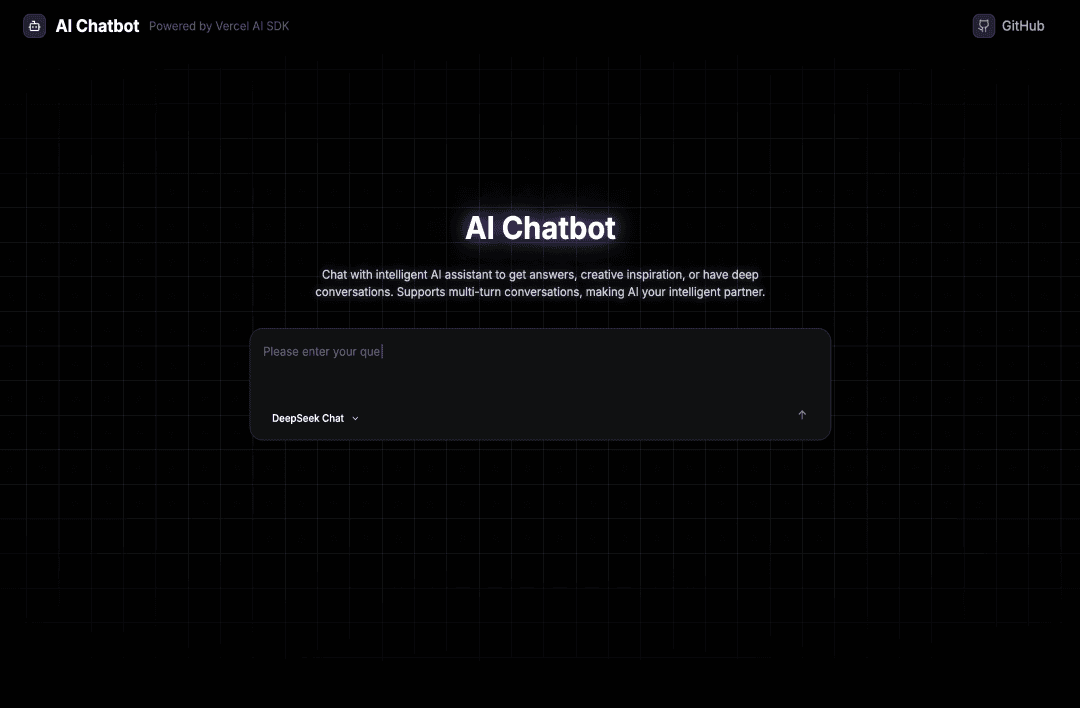
VERCEL AI SDK Chatbot Template - EdgeOne Pages
A modern AI chatbot template built with Next.js 14, Vercel AI SDK, and Tailwind CSS, specifically designed for deployment on EdgeOne Makers. This template provides a complete AI chat interface with support for multiple AI providers and models.
What is this template?
This template is a production-ready AI chatbot application that you can deploy directly to EdgeOne Makers with one click. It features:
- Multi-Provider Support: Works with DeepSeek, OpenAI, Anthropic, Google, and xAI models
- Modern UI: Dark theme design with smooth animations and responsive layout
- Real-time Streaming: Live AI responses with typing effects
- Error Handling: Comprehensive error handling and retry mechanisms
- EdgeOne Optimized: Specifically configured for EdgeOne Makers deployment
✨ Features
- 🤖 Multi-AI Support: DeepSeek, OpenAI GPT, Anthropic Claude, Google Gemini, xAI Grok
- 🎨 Modern UI: Dark theme with SVG background and smooth animations
- ⚡ Real-time Streaming: Live AI responses with typewriter effects
- 📱 Responsive Design: Works perfectly on desktop, tablet, and mobile
- 🎭 Smooth Animations: Page transitions, loading states, and interactive effects
- 🔧 Configurable: Easy model switching and parameter adjustment
- 🛡️ Robust Error Handling: Comprehensive error messages and retry functionality
- 🌐 EdgeOne Optimized: Built specifically for EdgeOne Makers deployment
🚀 Quick Start
1. Clone the Project
git clone https://github.com/tomcomtang/vercel-ai-sdk-chatbot.git
cd vercel-ai-sdk-chatbot
2. Install Dependencies
npm install
# or
yarn install
# or
pnpm install
3. Configure Environment Variables
Copy the environment variables example file:
cp env.example .env.local
Edit the .env.local file and add your API keys:
# DeepSeek API Key (Required for default model)
DEEPSEEK_API_KEY=your_deepseek_api_key_here

# Optional: Other AI Provider Keys
OPENAI_API_KEY=your_openai_api_key_here
ANTHROPIC_API_KEY=your_anthropic_api_key_here
GOOGLE_GENERATIVE_AI_API_KEY=your_google_api_key_here
XAI_API_KEY=your_xai_api_key_here
4. Start Development Server
npm run dev
# or
yarn dev
# or
pnpm dev
Open http://localhost:3000 to view the application.
🛠️ Tech Stack
- Framework: Next.js 14 (App Router)
- AI SDK: Vercel AI SDK v5
- AI Models: DeepSeek, OpenAI GPT, Anthropic Claude, Google Gemini, xAI Grok
- Styling: Tailwind CSS
- Icons: Lucide React
- Language: TypeScript
- Deployment: EdgeOne Makers
📁 Project Structure
vercel-ai-sdk-chatbot/
├── app/
│   ├── api/chat/route.ts    # AI chat API route
│   ├── globals.css          # Global styles
│   ├── layout.tsx           # Root layout
│   └── page.tsx             # Main page
├── components/
│   ├── ChatInput.tsx        # Chat input component
│   ├── HomeScreen.tsx       # Home screen component
│   ├── MessageList.tsx     # Message list component
│   ├── ModelSelector.tsx    # Model selection component
│   └── ErrorMessage.tsx     # Error message component
├── hooks/
│   ├── useChatLogic.ts      # Chat logic hook
│   └── useScrollLogic.ts    # Scroll logic hook
├── functions/
│   └── api/chat/index.js    # EdgeOne Makers Action
├── env.example              # Environment variables example
├── EDGEONE_SETUP.md         # EdgeOne deployment guide
├── package.json             # Project configuration
└── README.md                # Project documentation
⚙️ Configuration Options
Environment Variables
| Variable Name | Required | Default Value | Description |
|---|---|---|---|
DEEPSEEK_API_KEY | ✅ | - | DeepSeek API key |
OPENAI_API_KEY | ❌ | - | OpenAI API key |
ANTHROPIC_API_KEY | ❌ | - | Anthropic API key |
GOOGLE_GENERATIVE_AI_API_KEY | ❌ | - | Google AI API key |
XAI_API_KEY | ❌ | - | xAI API key |
Supported Models
- DeepSeek:
deepseek-v4-flash,deepseek-v4-pro - OpenAI:
gpt-5.5 - Anthropic:
claude-opus-4-8 - Google:
gemini-3.5-flash - xAI:
grok-4.5
🎨 Customization
Modify AI Behavior
Edit the system prompt in app/api/chat/route.ts:
system: `You are an intelligent AI assistant dedicated to helping users. Please follow these principles:
1. Provide accurate, useful, and concise answers
2. Maintain a friendly and professional tone
3. Be honest when uncertain about answers
4. Support both Chinese and English communication
5. Provide practical advice and solutions`;
Adjust AI Parameters
const result = await streamText({
  model: providerConfig.provider(selectedModel),
  messages: convertToModelMessages(uiMessages),
  maxOutputTokens: 1000, // Maximum output tokens
  temperature: 0.7, // Creativity (0-1)
  // ... other parameters
});
Custom Styling
The project uses Tailwind CSS, you can:
- Modify global styles in
app/globals.css - Update component styles in individual component files
- Customize the color scheme and animations
🚀 Deployment
EdgeOne Makers Deployment (Recommended)
- Click the "Deploy to EdgeOne" button above
- Configure environment variables in EdgeOne console
- Deploy automatically
Manual Deployment
- Push code to GitHub
- Connect your GitHub repository to EdgeOne Makers
- Configure environment variables in EdgeOne dashboard
- Deploy automatically
Other Deployment Options
- Vercel: Supports Next.js with API routes
- Netlify: Supports Next.js static export
- Railway: Full-stack deployment
📝 License
This project is licensed under the MIT License.
🤝 Contributing
- Fork the project
- Create your feature branch (
git checkout -b feature/AmazingFeature) - Commit your changes (
git commit -m 'Add some AmazingFeature') - Push to the branch (
git push origin feature/AmazingFeature) - Open a Pull Request
📞 Support
If you encounter any issues or have questions, please:
- Check the Issues page
- Create a new issue with detailed description
- Contact the maintainer
🙏 Acknowledgments
- Vercel AI SDK for providing excellent AI integration tools
- Next.js for the powerful React framework
- Tailwind CSS for the utility-first CSS framework
- EdgeOne Makers for cloud-edge integrated deployment platform
Made with ❤️ by tomcomtang