


TanStack: From Libraries to Full-Stack Framework
 Benjamin Carter
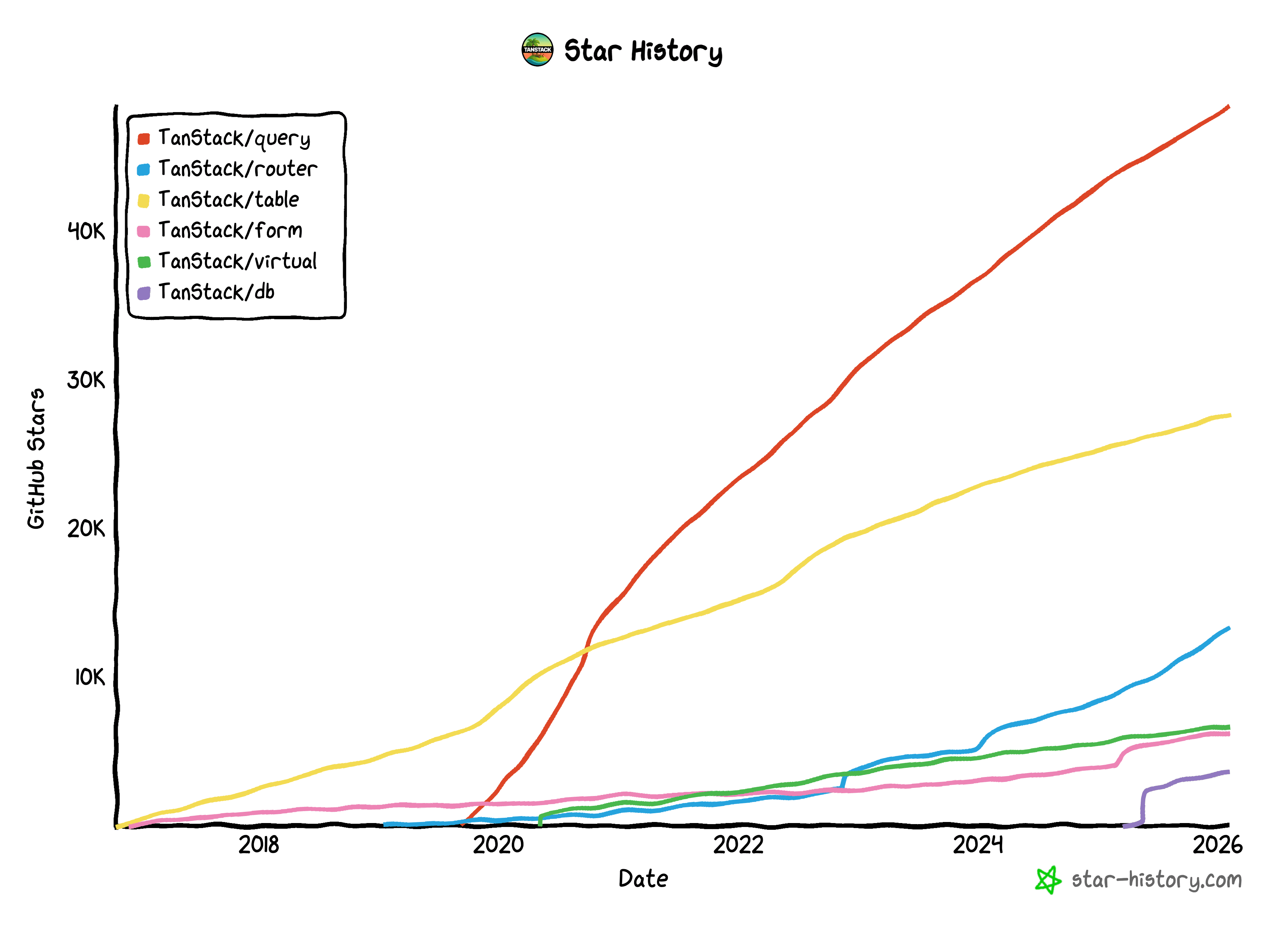
TanStack is a suite of high-quality, open-source tools designed for modern web applications. To date, its various modules have collectively amassed over 100k stars and 9.5k followers on GitHub. Its core strength lies in modularizing and standardizing the most challenging aspects of web development, distilling them into a comprehensive and production-ready ecosystem.
TanStack's Positioning
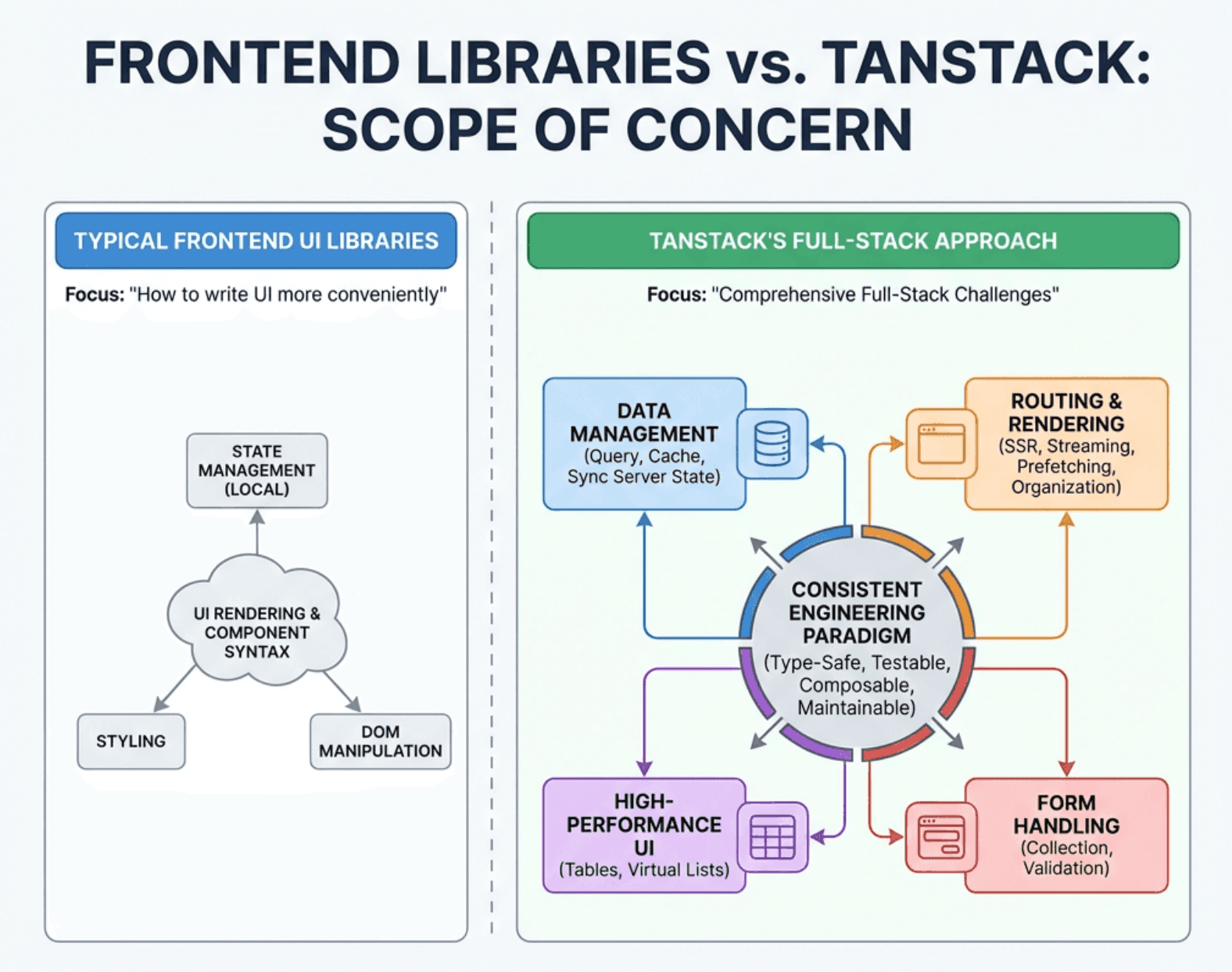
TanStack aims higher than just being a handy utility library; it seeks to tackle the systemic complexity inherent in modern full-stack applications.
It seamlessly bridges previously fragmented processes—such as routing, data fetching, and server-side rendering—into a unified, coherent workflow. When dealing with massive datasets or intricate form interactions, you will find that TanStack provides a rock-solid foundation rather than just a shortcut. It ensures that "high performance" and "high reliability" are no longer burdens for developers, but are instead woven into the very DNA of the framework.
Core Modules
To realize its core philosophy and address the most persistent challenges in web development, TanStack has engineered a comprehensive suite of purpose-built tool modules.
TanStack Query
TanStack Query is the most widely used module, designed to tackle the most critical data flow challenges in full-stack development. Its hallmark is a "cache-centric data flow" that allows data to be seamlessly reused across various components. By focusing on "server state" management, it transforms tedious yet high-frequency tasks—such as fetching, caching, synchronization, and invalidation—into a set of robust declarative capabilities.
import { useQuery } from '@tanstack/react-query';

function UserProfile({ userId }) {
  const { data, isLoading, error } = useQuery({
    queryKey: ['user', userId],
    queryFn: () => fetch(`/api/users/${userId}`).then(res => res.json()),
  });

  if (isLoading) return <div>loading...</div>;
  if (error) return <div>error: {error.message}</div>;

  return <div>hello, {data.name}</div>;
}
All you need to do is define your data requirements using declarative queryKeys. The framework abstracts away the boilerplate—such as request deduplication, cache invalidation, and automatic retries—freeing you from the manual maintenance of loading and error states so you can focus your energy where it truly matters: the business logic.
Compared to alternative solutions, TanStack Query’s core advantage lies in its professionalized treatment of "server state management" as a distinct domain. It eliminates the cumbersome boilerplate and manual overhead associated with general-purpose libraries like Redux, while systematically resolving the thorny edge cases—such as race conditions, caching, and retries—that are notoriously difficult to handle in hand-rolled useEffect implementations. The result is high stability and reliability right out of the box.
Tanstack Router
While TanStack Query handles data flow with efficiency and stability, TanStack Router acts as the conductor, orchestrating Query from a higher level. Because the router knows the user's destination, it leverages loader hooks to issue data-fetching instructions before or during the navigation.
In traditional development patterns, the router is only responsible for switching components, which then trigger Query via useEffect. This often leads to "network waterfalls."
With TanStack Router, simply hovering over a link can trigger Query to prefetch data. The router then renders the complete page all at once after the data is ready, resulting in a significant boost in perceived speed.
// 1. Define Query options (reusable logic)
const userQueryOptions = (id) => ({
  queryKey: ['user', id],
  queryFn: () => fetchUser(id),
});

// 2. Configure the loader at the route level
const userRoute = createRoute({
  path: '/user/$userId',
  // Key: Prefetch data before the route transition starts and store it in the Query cache
  loader: ({ params }) => queryClient.ensureQueryData(userQueryOptions(params.userId)),
  component: UserComponent,
});

function UserComponent() {
  const { userId } = userRoute.useParams();
  // Since data is already in the cache, it's read synchronously.
  // No waterfalls, no secondary loading spinners.
  const { data } = useSuspenseQuery(userQueryOptions(userId));
  return <div>{data.name}</div>;
}
The Power Duo: TanStack Virtual + Table
The integration of TanStack Table and TanStack Virtual is, at its core, a powerful synergy between "data logic" and "rendering performance."
As the underlying "logic engine," TanStack Table adopts a headless design, specializing in complex interaction logic—such as sorting, filtering, grouping, and pagination—without dictating the specific UI implementation.
However, when dealing with thousands of rows, logic alone cannot resolve the performance lag caused by an excessive number of DOM nodes. This is where TanStack Virtual steps in as a "performance accelerator." Through virtualization, it ensures that only the rows or cells currently within the user's viewport are rendered.
When the two are combined, Table provides the precise row models and state management, while Virtual "feeds" this data to the browser in the most efficient manner possible. This synergy preserves full functional integrity while slashing rendering overhead to the absolute minimum, delivering a seamless and high-performance user experience.
import { useReactTable, getCoreRowModel, flexRender } from '@tanstack/react-table';
import { useVirtualizer } from '@tanstack/react-virtual';

function VirtualTable({ columns, data }) {
  const parentRef = React.useRef();

  // 1. Table handles logic: processing data models, sorting, filtering, etc.
  const table = useReactTable({
    data,
    columns,
    getCoreRowModel: getCoreRowModel(),
  });

  const { rows } = table.getRowModel();

  // 2. Virtual handles performance: calculating which rows should be rendered in the viewport
  const rowVirtualizer = useVirtualizer({
    count: rows.length,
    getScrollElement: () => parentRef.current,
    estimateSize: () => 35, // Estimated row height
  });

  return (
    <div ref={parentRef} style={{ height: '500px', overflow: 'auto' }}>
      <div style={{ height: `${rowVirtualizer.getTotalSize()}px`, position: 'relative' }}>
        {rowVirtualizer.getVirtualItems().map((virtualRow) => {
          const row = rows[virtualRow.index];
          return (
            <div
              key={row.id}
              style={{
                position: 'absolute',
                top: 0,
                transform: `translateY(${virtualRow.start}px)`,
              }}
            >
              {/* 3. Render Table's logical data into the container provided by Virtual */}
              {row.getVisibleCells().map(cell => (
                <span key={cell.id}>
                  {flexRender(cell.column.columnDef.cell, cell.getContext())}
                </span>
              ))}
            </div>
          );
        })}
      </div>
    </div>
  );
}
TanStack Start: The Full-Stack Piece
The launch of TanStack Start marks the evolution of TanStack from a collection of utility libraries into a true full-stack solution. It breaks down the boundaries between individual modules, providing a seamless pipeline that spans from route definition and data fetching to SSR and client-side interactivity.
In simple terms, it is a full-stack framework built upon TanStack Router as its foundation. By deeply leveraging the state management capabilities of the Router, it standardizes SSR, data loading, and navigation workflows. Developers no longer need to struggle with "stitching" various libraries together; instead, they can embrace the "Route as the Data Boundary" philosophy. Advanced features like streaming SSR and isomorphic requests are now available out of the box.
Framework Comparison
| Dimension | TanStack Start | Next.js | Nuxt |
| Data Fetching | Route-level loaders/actions; "Route as the Data Boundary" philosophy. | Server Components + fetch + Route Handlers / Server Actions. | asyncData / useFetch + Nitro (Server Routes). |
| Routing | TanStack Router: Type-safe routing, nested layouts, and tight data-route orchestration. | App Router: Convention-based nested layouts, parallel routes, etc. | File-based routing with nested layouts and middleware. |
| Rendering | SSR-centric, with SSG as an option. | Hybrid: SSR / SSG / ISR. | Versatile: SSR / SSG / ISR / ESR (Edge-side rendering via Nitro). |
| Ecosystem | Strong synergy within the TanStack family, but the full-stack framework ecosystem is relatively new. | The largest React full-stack ecosystem with extensive third-party support. | Powerful Vue ecosystem; Nuxt Modules and Nitro provide broad server-side compatibility. |
For more information on TanStack modules, please visit the TanStack GitHub repository.
Selection Guide: From Tools to Integration
One of TanStack's greatest strengths is its progressive adoption model, allowing developers to integrate its tools incrementally through a step-by-step migration:
- Managing Requests & Caching: Begin with TanStack Query.
- Complex Tables as a Core Pain Point: Introduce TanStack Table (and add TanStack Virtual if performance becomes a bottleneck).
- Scaling Routing & Data Loading: As the project matures and routing logic becomes intricate, evaluate TanStack Router.
- New Projects & Unified Architecture: Look toward TanStack Start, or jumpstart your development using the Start templates on EdgeOne Pages.
For legacy projects, this "solve specific pain points first, integrate later" strategy is often far more stable than a high-risk "rip-and-replace" of the entire framework.
Deploying on EdgeOne Pages
EdgeOne Pages provides robust, end-to-end deployment support for the TanStack Start full-stack framework. Through deep-level integration and optimization, it effectively addresses critical technical challenges such as SSR implementation, streaming responses, and routing rewrite rules.
With pre-configured TanStack templates, developers can rapidly experience a seamless, integrated "develop-to-deploy" workflow on EdgeOne Pages.
How it Works: Adaptation Principles
EdgeOne Pages enables seamless platform adaptation and deployment for TanStack Start through its dedicated adapter, @edgeone/tanstack-start. This adapter is a Vite plugin designed to deploy TanStack Start applications to the EdgeOne Pages platform. Built upon the @edgeone/vite-core library, it provides full-framework support for TanStack Start via declarative configuration.
Core Features
- 🔍 Auto-Detection: Automatically identifies TanStack Start projects (supporting both React and SolidJS).
- 📦 Smart Bundling: Utilizes esbuild combined with NFT (Node File Trace) for efficient dependency tracking and server-side code bundling.
- 🛣️ Route Parsing: Automatically resolves routing configurations directly from TanStack Router.
- 🔌 Glue Layer Adaptation: Bridges the framework's output with the EdgeOne Function format using a specialized Server Wrapper.
- 🌐 Edge Optimization: Generates deployment artifacts that strictly adhere to EdgeOne platform specifications.
Adapter Execution Workflow
- Static Asset Migration: Copies static files (HTML, CSS, JS, etc.) from
dist/clientto the.edgeone/assets/directory. - Server-side Bundling: Uses esbuild to bundle server-side code from
dist/serverand its dependencies into a singlehandler.js. - Glue Layer Generation: Creates the Server Wrapper code, adapting the framework’s internal
fetchhandlers to the EdgeOne Function format. - Route Configuration Parsing: Analyzes
routeTree.gen.tsor the routing directory to generatemeta.json, which is used by the platform for intelligent route distribution.
You can consult our Framework Guides at any time for the latest compatibility information and optimization tips tailored to your chosen framework.