


Multimodal File Assistant Agent
An AI Agent that processes uploaded PDF, Word, Excel, images and videos. Supports document conversion (Word→PDF, Excel→Markdown), data analysis, and file export via EdgeOne sandbox.

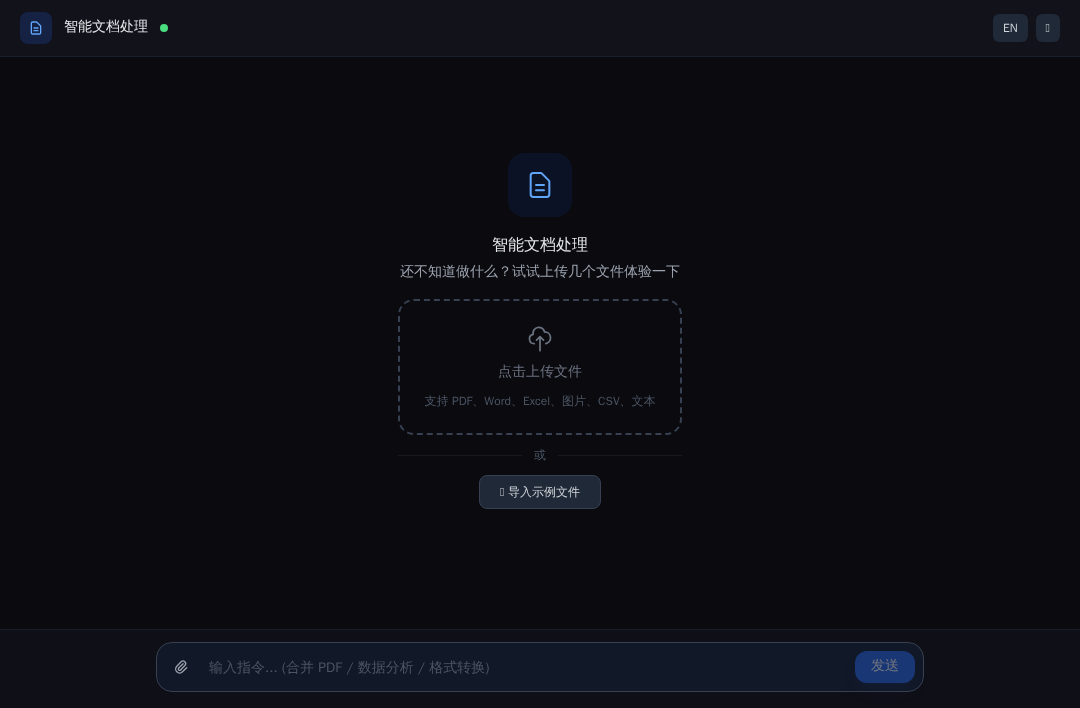
Multimodal File Assistant Agent
AI-powered document processing agent that analyzes uploaded files (images, PDFs, CSVs, Word, Excel, text) and performs interactive operations via sandbox execution. Built on the Claude Agent SDK and deployed on EdgeOne Makers.
Framework: Claude Agent SDK · Category: File Processing · Language: TypeScript

Overview
This template turns uploaded files into actionable insights and transformed outputs. It auto-detects file types, loads specialized processing skills, runs Python and shell commands inside a secure sandbox, and delivers generated files back to the user. A dual MCP server architecture exposes both sandbox tools (code interpreter, commands, file I/O) and custom UI tools (action suggestions, file delivery) to the AI agent.
- Skills-Based Analysis — Dynamically loads file-type-specific skills (image, CSV, PDF, Word, Excel, text) to tailor the system prompt and available operations.
- Sandbox Execution — Runs Python (Pillow, pandas, matplotlib, pdfplumber, python-docx) and shell commands (ffprobe, ffmpeg) in an EdgeOne sandbox with automatic credential injection.
- Interactive Actions — After analysis, the agent presents clickable action cards via the
suggest_actionscustom tool; processed files are delivered viadeliver_fileas base64-downloadable links. - Session File Cache — Uploaded files persist across follow-up requests within the same conversation via an in-process cache that re-uploads to the sandbox on every turn.
- Bilingual UI — Full Chinese / English interface with locale-aware AI output.
Environment Variables
| Variable | Required | Description |
|---|---|---|
AI_GATEWAY_API_KEY | Yes | Model gateway API key. Use your Makers Models API Key, or any OpenAI-compatible provider key. |
AI_GATEWAY_BASE_URL | Yes | Gateway base URL. For Makers Models, use https://ai-gateway.edgeone.link/v1. |
AI_GATEWAY_MODEL | No | Model ID. Defaults to @makers/deepseek-v4-flash. |
This template follows the OpenAI-compatible standard — point these at Makers Models or any compatible provider.
How to get AI_GATEWAY_API_KEY
- Open the Makers Console (https://edgeone.ai/makers/new?s_url=https://console.tencentcloud.com/edgeone/makers)
- Sign in and enable Makers
- Go to Makers → Models → API Key and create a key
- Copy it into
AI_GATEWAY_API_KEY
Built-in models are free within quota and great for validation. For production, bind your own paid provider key (BYOK).
Local Development
Prerequisites
- Node.js 18+
- EdgeOne CLI (
npm i -g edgeone)
npm install
cp .env.example .env
# Edit .env with your AI_GATEWAY_API_KEY and AI_GATEWAY_BASE_URL
edgeone makers dev
Open the local observability dashboard at http://localhost:8088/agent-metrics.
Project Structure
multimodal-file-assistant-agent/
├── agents/
│   ├── chat/
│   │   ├── index.ts       # POST /chat — main agent: session mgmt, file upload, SSE loop
│   │   ├── _skills.ts     # Dynamic system prompt builder per file type
│   │   ├── _templates.ts  # PDF generation templates (CJK font support)
│   │   └── _tools.ts      # Shell quoting, fallback file inlining, default actions
│   ├── stop/
│   │   └── index.ts       # POST /stop — abort active run
│   ├── _model.ts          # Model name resolution, gateway env mapping
│   └── _shared.ts         # SSE helpers, logger
├── cloud-functions/
│   ├── health/
│   │   └── index.ts       # GET /health — liveness probe
│   └── _logger.ts         # Shared cloud-function logger
├── app/                   # Next.js App Router frontend
├── lib/
│   └── i18n.tsx           # Chinese / English translations
└── edgeone.json           # EdgeOne deployment config
Files prefixed with _ are private modules — not exposed as public routes.
How It Works
Runtime Mode
Files under agents/ run in session mode: requests with the same conversation_id are sticky-routed to the same agent instance and the same sandbox. This ensures uploaded files and sandbox state remain available across follow-up messages.
End-to-End Workflow
- File upload — The frontend encodes files as base64 and POSTs
/chatwith themakers-conversation-idHTTP header and body{ message, files }. - Session cache — Files are merged into a per-conversation in-process cache so they survive across follow-up turns.
- Sandbox write — The handler writes cached files to
/tmp/in the EdgeOne sandbox using base64 decode (shellbase64 -dor Python fallback). - Skill selection — The system prompt is built dynamically based on uploaded file types (image, CSV, PDF, Word, Excel, text, or mixed), loading only the relevant skill instructions.
- Agent loop — The Claude Agent SDK
query()loop drives the LLM with two MCP servers:- EdgeOne sandbox MCP (
context.tools.toClaudeMcpServer()) exposescode_interpreter,commands, and file I/O tools. - Custom tools MCP exposes
suggest_actions(UI action cards) anddeliver_file(downloadable output).
- EdgeOne sandbox MCP (
- Tool execution — The AI may run Python for data analysis, shell commands for media processing, or read/write sandbox files.
- SSE streaming — Events include
text_delta(assistant text),tool_called(tool start),code_output/code_error(execution results),suggest_actions(clickable options), andfile_output(base64 download). - Fallback — If the sandbox is unavailable, text files are inlined directly into the prompt; binary files are skipped with a notice.
Key Routes & Parameters
/chat— Main processing endpoint. Header:makers-conversation-id: <uuid>; Body:{ message, files[] }./stop— Cancels the active query run for a conversation. Body:{ conversation_id: <uuid> }(do NOT send themakers-conversation-idheader — it would sticky-route /stop to the busy chat instance and break abort)./health— Simple liveness probe (lives incloud-functions/, not AI-related).conversation_idis generated client-side (crypto.randomUUID()) and forwarded via themakers-conversation-idheader; the runtime auto-binds it tocontext.conversation_id.
Timeouts
No custom agent timeout is configured; the platform default applies.
Resources
License
MIT