


Deep research web ui
AI research assistant (DeepSeek R1 supported) combining search engines, web scraping, and LLMs for iterative deep research.

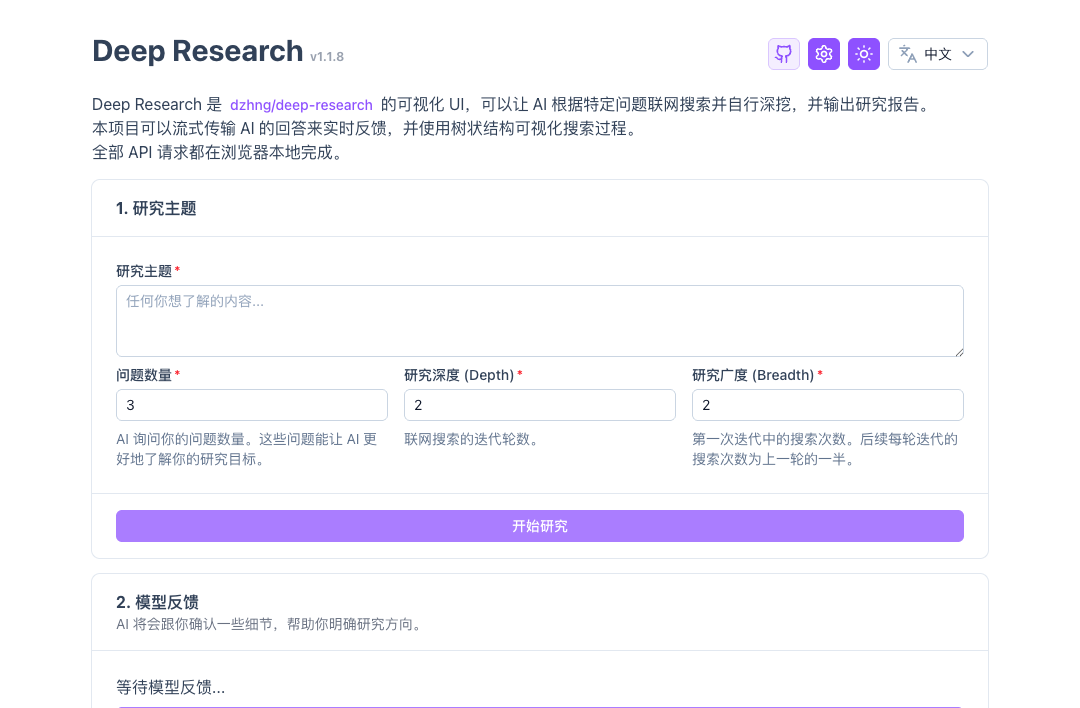
Deep Research Web UI
[English | 中文]
This is a web UI for https://github.com/dzhng/deep-research, with several improvements and fixes.
Features:
- 🚀 Safe & Secure: In Client Mode, config and API requests stay in your browser locally
- 🕙 Realtime feedback: Stream AI responses and reflect on the UI in real-time
- 🌳 Search visualization: Shows the research process using a tree structure. Supports searching in different languages
- 📄 Export as PDF: Export the final research report as Markdown / PDF
- 🤖 Supports more models: Uses plain prompts instead of newer, less widely supported features like Structured Outputs. This ensures to work with more providers that haven't caught up with the latest OpenAI capabilities.
- 🐳 Docker support: Deploy in your environment in one-line command
- 🔧 Server Mode: Deploy with environment variables, no need for users to configure API keys
Currently available providers:
- AI: OpenAI compatible, ApiSmart, SiliconFlow, InfiniAI, DeepSeek, OpenRouter, Ollama and more
- Web Search: Tavily (1000 free credits / month), Firecrawl (cloud / self-hosted), fastCRW (cloud / self-hosted), Google PSE
Please give a 🌟 Star if you like this project!
Sponsors
MangoProxy provides Residential, ISP, Mobile, and Datacenter proxies in 200+ locations for web scraping, automation, SEO, and multi-account management. Promo code: GITHUBISP - 8% off Static ISP proxies.
ApiSmart.ai provides unified access to leading AI models through a single API. Use one API key to connect with LLM, image, and video models through an OpenAI-compatible interface, without managing multiple providers separately. Switch models easily, simplify billing, and improve reliability with intelligent routing and automatic failover. Build and scale AI applications faster with one streamlined API platform.
How to use
Live demo: https://deep-research.ataw.top
Self hosted
Server Mode (Recommended)
Deploy with environment variables - users don't need to configure API keys. Use this mode when you can run the Nuxt server:
Using Docker with environment variables:
docker run -p 3000:3000 \
  -e NUXT_PUBLIC_SERVER_MODE=true \
  -e NUXT_AI_API_KEY=your-ai-api-key \
  -e NUXT_WEB_SEARCH_API_KEY=your-search-api-key \
  -e NUXT_PUBLIC_AI_PROVIDER=openai-compatible \
  -e NUXT_PUBLIC_AI_MODEL=gpt-4o-mini \
  -e NUXT_PUBLIC_WEB_SEARCH_PROVIDER=tavily \
  anotia/deep-research-web:latest
Using Docker with .env file:
# Copy .env.example and update it with your configuration
cp .env.example .env
docker run -p 3000:3000 --env-file .env anotia/deep-research-web:latest
Client Mode (Traditional)
Users configure their own API keys in the browser. Use this mode for static deployments:
One-click deploy with EdgeOne Pages:

Use pre-built Docker image:
docker run -p 3000:3000 --name deep-research-web -d anotia/deep-research-web:latest
Use self-built Docker image:
git clone https://github.com/AnotiaWang/deep-research-web-ui
cd deep-research-web-ui
docker build -t deep-research-web .
docker run -p 3000:3000 --name deep-research-web -d deep-research-web
Environment Variables
Server Mode Configuration
| Variable | Description | Default |
|---|---|---|
NUXT_PUBLIC_SERVER_MODE | Enable server mode | false |
NUXT_AI_API_KEY | AI provider API key | - |
NUXT_AI_API_BASE | AI provider base URL | - |
NUXT_WEB_SEARCH_API_KEY | Web search API key | - |
NUXT_WEB_SEARCH_API_BASE | Web search base URL | - |
Public Configuration (Server Mode)
| Variable | Description | Default |
|---|---|---|
NUXT_PUBLIC_AI_PROVIDER | AI provider type | openai-compatible |
NUXT_PUBLIC_AI_MODEL | AI model name | gpt-4o-mini |
NUXT_PUBLIC_AI_CONTEXT_SIZE | Context size | 128000 |
NUXT_PUBLIC_WEB_SEARCH_PROVIDER | Search provider | tavily |
NUXT_PUBLIC_WEB_SEARCH_CONCURRENCY_LIMIT | Max concurrency | 2 |
NUXT_PUBLIC_WEB_SEARCH_SEARCH_LANGUAGE | Search language | en |
NUXT_PUBLIC_TAVILY_ADVANCED_SEARCH | Use Tavily advanced search | false |
NUXT_PUBLIC_TAVILY_SEARCH_TOPIC | Tavily search topic | general |
NUXT_PUBLIC_GOOGLE_PSE_ID | Google PSE ID | - |
Provider values
| Type | Supported values |
|---|---|
| AI provider | openai-compatible, siliconflow, 302-ai, infiniai, openrouter, requesty, deepseek, ollama, litellm |
| Web search provider | tavily, firecrawl, crw, google-pse |
Notes:
NUXT_WEB_SEARCH_API_KEYsupports comma-separated keys for Tavily and Google PSE, for examplekey1,key2,key3.- Google PSE requires both
NUXT_WEB_SEARCH_API_KEYandNUXT_PUBLIC_GOOGLE_PSE_ID. - Firecrawl self-hosted deployments can set
NUXT_WEB_SEARCH_API_BASE. - fastCRW (
crw) is a Firecrawl-compatible web scraper (single binary; self-host or cloud). It defaults to the cloud basehttps://fastcrw.com/apiand reads the key fromNUXT_WEB_SEARCH_API_KEY(document asCRW_API_KEY); self-hosted deployments can setNUXT_WEB_SEARCH_API_BASE. - Ollama uses
http://localhost:11434/v1as the default API base. When running the app inside Docker,localhostrefers to the container itself, so setNUXT_AI_API_BASEto a reachable host or Docker network address if Ollama runs outside the container. - LiteLLM uses
http://localhost:4000/v1as the default API base. Its API key is optional when the proxy does not require authentication; setNUXT_AI_API_BASEwhen the proxy is not reachable at the default local address. - Requesty uses
https://router.requesty.ai/v1as the default API base and expects model IDs inprovider/modelformat, such asopenai/gpt-4o.
Developing
Setup
Make sure to install dependencies:
pnpm install
Development Server
Start the development server on http://localhost:3000:
pnpm dev
Production
Build the application for production:
If you want to deploy a SSR application:
pnpm build
If you want to deploy a static, SSG application:
pnpm generate
Locally preview production build:
pnpm preview
Check out the deployment documentation for more information.
License
MIT