


Deep Research Agent
A multi-agent deep research assistant with human-in-the-loop sub-question confirmation, web search (Tencent Cloud Web Search API), academic search (CrossRef + Semantic Scholar), iterative report generation, and project-based version management.

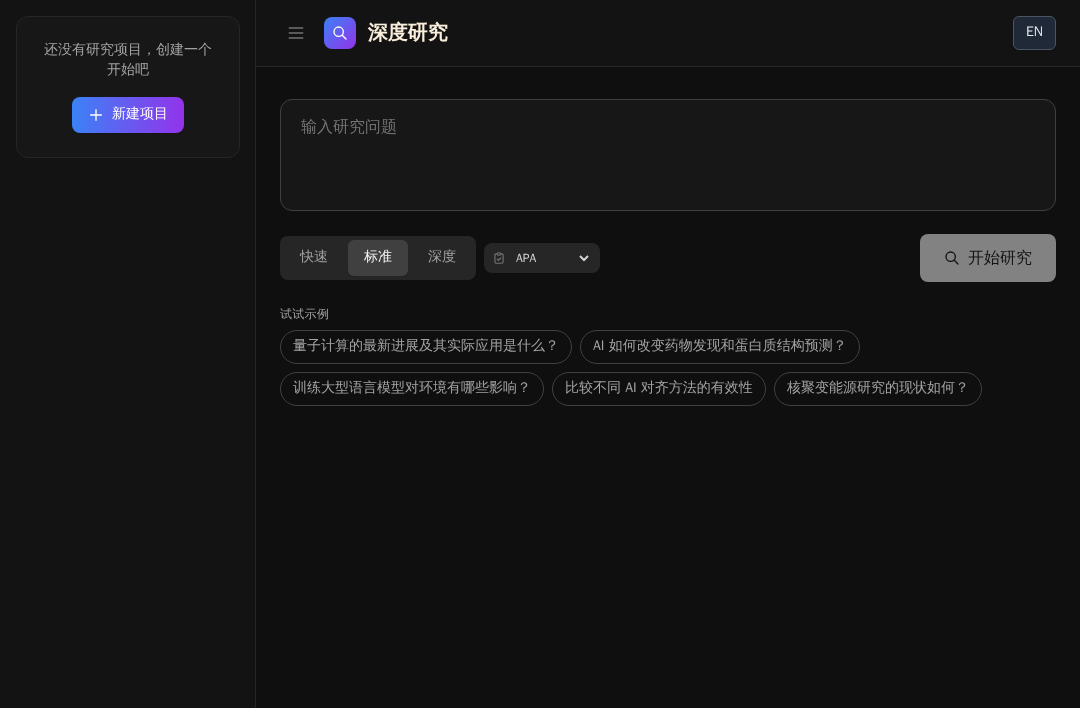
Deep Research Agent
Multi-agent deep research assistant with human-in-the-loop sub-question confirmation, web search, academic search, iterative report generation, and project-based version management. Built on the OpenAI Agents SDK and deployed on EdgeOne Makers.
Framework: OpenAI Agents SDK · Category: Research · Language: TypeScript

Overview
This template runs a structured research pipeline that breaks a user question into sub-questions, gathers evidence from both the open web and academic databases, and synthesizes a cited research report. A follow-up chat mode lets users discuss and refine completed reports without re-running searches.
- Human-in-the-Loop Decomposition — The agent first breaks the research question into sub-questions and waits for user confirmation before proceeding.
- Dual-Source Research — Parallel web search (Tencent Cloud Web Search API) and academic search (CrossRef + Semantic Scholar) with URL scraping for detailed content.
- Iterative Report Generation — A synthesizer agent produces the final report with inline citations; a cleanup stage validates citation formatting.
- Project Version Management — Research reports are saved per-project with version history, diffing, and rollback support.
- Follow-Up Chat — A lightweight conversational endpoint answers questions about an existing report and can trigger regeneration.
Environment Variables
| Variable | Required | Description |
|---|---|---|
AI_GATEWAY_API_KEY | Yes | Model gateway API key. Use your Makers Models API Key, or any OpenAI-compatible provider key. |
AI_GATEWAY_BASE_URL | Yes | Gateway base URL. For Makers Models, use https://ai-gateway.edgeone.link/v1. |
AI_GATEWAY_MODEL | No | Model ID. Defaults to @makers/deepseek-v4-flash. |
WSA_API_KEY | No | Tencent Cloud Web Search API (WSA) key for the platform's built-in web_search tool. Without it, web search falls back to a less reliable path. |
This template follows the OpenAI-compatible standard — point these at Makers Models or any compatible provider.
How to get AI_GATEWAY_API_KEY
- Open the Makers Console (https://edgeone.ai/makers/new?s_url=https://console.tencentcloud.com/edgeone/makers)
- Sign in and enable Makers
- Go to Makers → Models → API Key and create a key
- Copy it into
AI_GATEWAY_API_KEY
Built-in models are free within quota and great for validation. For production, bind your own paid provider key (BYOK).
How to get WSA_API_KEY
- Enable Web Search (WSA) in the Tencent Cloud WSA Console (https://console.cloud.tencent.com/wsapi/index)
- Obtain the API Key and set it as
WSA_API_KEY - Reference: WSA API Documentation
If you do not use Tencent Cloud WSA, the
web_searchtool implementation can be replaced with a third-party search service (e.g. Exa, Tavily).
Local Development
Prerequisites
- Node.js 18+
- EdgeOne CLI (
npm i -g edgeone)
npm install
cp .env.example .env
# Edit .env with your AI_GATEWAY_API_KEY, AI_GATEWAY_BASE_URL, and WSA_API_KEY
edgeone makers dev
Open the local observability dashboard at http://localhost:8088/agent-metrics.
Project Structure
deep-research-agent/
├── agents/
│   ├── research.ts         # POST /research — main research pipeline
│   ├── chat.ts             # POST /chat — follow-up discussion
│   ├── stop.ts             # POST /stop — abort active run
│   ├── _tools.ts           # Tool factories (decompose, search, scrape)
│   ├── _prompts.ts         # System prompt builder
│   ├── _sources.ts         # Academic API parsers (CrossRef, Semantic Scholar)
│   ├── _project-store.ts   # Version persistence helpers
│   ├── _follow-up.ts       # No-search edit path for report refinement
│   ├── _report-cleanup.ts  # Post-processing and citation validation
│   └── _shared.ts          # SDK re-exports, SSE helpers, logger
├── cloud-functions/
│   ├── project/            # Project & version storage
│   ├── enrich-doi/         # DOI metadata enrichment
│   ├── health/             # GET /health
│   ├── _http.ts            # HTTP client utilities
│   └── _logger.ts          # Shared cloud-function logger
├── app/                    # Next.js App Router frontend
├── lib/
│   └── i18n.tsx            # Chinese / English translations
└── edgeone.json            # EdgeOne deployment config
Files prefixed with _ are private modules — not exposed as public routes.
How It Works
Runtime Mode
Files under agents/ run in session mode: requests with the same conversation_id are sticky-routed to the same agent instance and the same sandbox. This ensures conversation history and uploaded context persist across follow-up messages.
End-to-End Workflow
- Question input — The frontend POSTs
/researchwith the research question, depth level, and optional project ID. - Sub-question decomposition — A decomposer agent breaks the question into focused sub-questions (2–7 depending on depth). The frontend presents these for user confirmation.
- User confirmation — The user edits or confirms the sub-questions. The frontend then POSTs
/researchagain withconfirmedSubQuestionsto enter full research mode. - Parallel research — The research agent spawns parallel tool calls:
- Web search (
search_web) via the platform'sweb_searchtool (Tencent Cloud WSA). - Academic search (
search_literature) via CrossRef and Semantic Scholar APIs.
- Web search (
- URL scraping — Key URLs from web search results are scraped for detailed content using the platform
browser_fetchtool. - Report synthesis — A synthesizer agent combines all sources into a structured research report with inline citations.
- Cleanup & validation — The report passes through post-processing (preamble stripping, citation validation, structure cleanup).
- Persistence — The final report is saved as a project version via
cloud-functions/project/. - Follow-up chat — Users can POST
/chatwith an existing report to ask questions or request edits without re-running searches.
Key Routes & Parameters
/research— Main research endpoint. Body:{ question, depth, projectId, confirmedSubQuestions?, decomposeOnly? }./chat— Follow-up discussion about a completed report. Body:{ message, projectId, chatHistory, report }./stop— Aborts the active research run. Body:{ conversation_id }./health— Liveness probe (lives incloud-functions/, not AI-related).conversation_idis generated client-side and forwarded via themakers-conversation-idheader; the runtime auto-binds it tocontext.conversation_id.
Timeouts
Agent timeout is set to 300 seconds in edgeone.json to accommodate long-running research synthesis.
Resources
License
MIT