


Back to Templates
Tencent COS Batch Uploader
Tencent COS batch uploader with pre-signed uploads, file management, and bucket lifecycle control. Built with Next.js.
| Framework | Next.js |
| Database | Tencent COS |

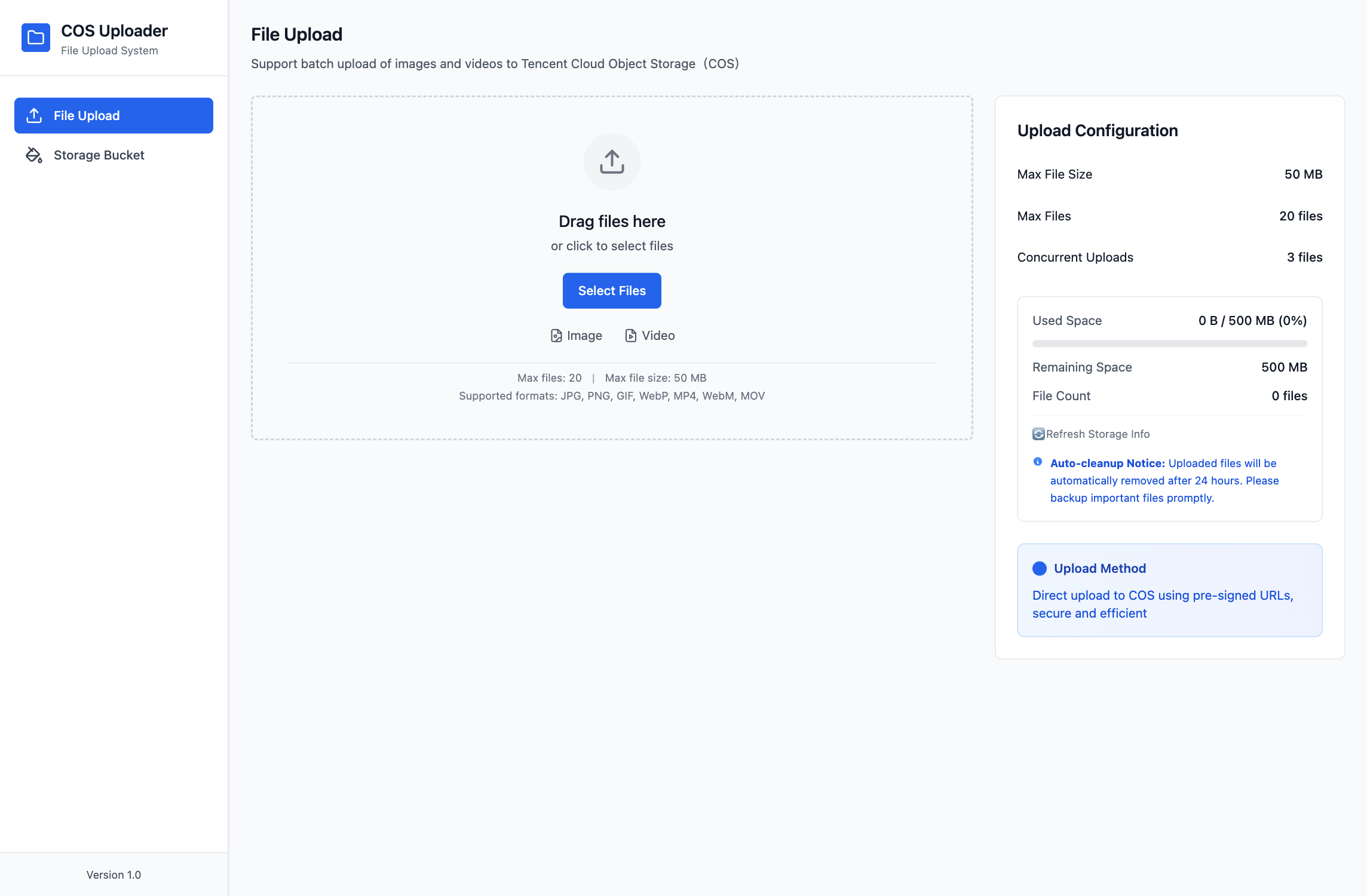
🚀 Tencent Cloud COS Batch Uploader
A fully-featured, beautifully designed Tencent Cloud COS batch file upload system with drag-and-drop upload, progress monitoring, and advanced features.
✨ Features
📁 File Upload
- ✅ Drag & Drop - Support dragging files to the page for upload
- ✅ Click to Select - Traditional file selection method
- ✅ Batch Processing - Select multiple files for batch upload at once
- ✅ File Preview - Display image thumbnails and video covers
- ✅ File Information - Show file format, size and other details
📊 Progress Monitoring
- ✅ Real-time Progress Bar - Display upload progress for each file
- ✅ Upload Status - Pending, uploading, success, and failure status indicators
- ✅ Progress Overlay - Show semi-transparent progress layer on file preview during upload
- ✅ Error Handling - Display error messages and retry options when upload fails
⚙️ Advanced Configuration
- ✅ Concurrency Control - Configurable number of simultaneous uploads
- ✅ File Selection - Check/uncheck files to upload
📋 Bucket Management
- ✅ Bucket View - View list of uploaded files
- ✅ File Details - Click to view detailed file information
🎨 User Interface
- ✅ Modern Design - Clean and beautiful user interface
- ✅ Responsive Layout - Adapt to different screen sizes
- ✅ Status Feedback - Rich visual feedback and interactive effects
🚀 Quick Start
1. Configure Tencent Cloud COS
Please configure your Tencent Cloud COS settings before use:
# Copy environment variable template
cp .env.example .env.local

# Edit configuration file
nano .env.local
Fill in your Tencent Cloud COS configuration:
COS_SECRET_ID=your-secret-id
COS_SECRET_KEY=your-secret-key
COS_BUCKET=your-bucket-name-appid
COS_REGION=your-bucket-region
2. Tencent Cloud COS Setup
Create COS Bucket
- Log in to Tencent Cloud Console
- Create a new COS bucket
- Configure CORS policy:
[
  {
    "allowedOrigin": ["*"],
    "allowedMethod": ["GET", "PUT", "POST", "DELETE", "HEAD"],
    "allowedHeader": ["*"],
    "exposeHeader": ["ETag", "Content-Length"],
    "maxAgeSeconds": 3600
  }
]
Create Access Keys
- Go to Access Management > API Key Management
- Create a new key pair (SecretId and SecretKey)
- Configure bucket access permission policy:
{
  "version": "2.0",
  "statement": [
    {
      "effect": "allow",
      "action": [
        "name/cos:GetObject",
        "name/cos:PutObject",
        "name/cos:DeleteObject",
        "name/cos:GetBucket"
      ],
      "resource": [
        "qcs::cos:ap-guangzhou:uid/your-appid:your-bucket-name-appid/*"
      ]
    }
  ]
}
🔧 Development
Install Node.js 18.x
The project is developed using Next.js 14.x, so the minimum supported version of Node.js is 18.x
Install Dependencies
npm install
Start Development Server
npm run dev
# Or use startup script
./start.sh
Build for Production
npm run build
npm start
Project currently running at: http://localhost:3004
Code Linting
npm run lint
📖 User Guide
Upload Files
- Visit http://localhost:3004
- Select "Upload" page (default)
- Drag files to upload area or click to select files
- Configure upload options
- Check the files to upload
- Click "Start Upload"
View Bucket
- Click "Bucket" menu on the left
- Browse uploaded files
- Click on a file to view detailed information
Advanced Features
- Batch Operations: Upload multiple files simultaneously
🛠️ Technical Architecture
Frontend Stack
- Next.js 14 - React full-stack framework
- TypeScript - Type safety
- Tailwind CSS - Styling framework
- Lucide React - Icon library
Backend Integration
- Tencent Cloud COS JS SDK - COS client
- Presigned URLs - Secure file upload
Core Features
- Custom Hooks - File upload logic encapsulation
- State Management - React useState/useEffect
- Error Handling - Comprehensive exception handling mechanism
📁 Project Structure
cos-batch-uploader/
├── app/                    # Next.js App Router
│   ├── api/               # API routes
│   │   ├── upload-batch/  # Batch upload API
│   │   ├── cos-files/     # COS file management API
│   │   └── storage-usage/ # Storage usage API
│   ├── components/        # React components
│   │   ├── FileUpload/    # File upload components
│   │   ├── Navigation/    # Navigation components
│   │   └── ui/           # Common UI components
│   ├── hooks/            # Custom Hooks
│   │   ├── useFileUpload.ts
│   │   └── useCOSFiles.ts
│   ├── lib/              # Utility library
│   │   └── cos-client.ts  # COS client configuration
│   ├── types/            # TypeScript type definitions
│   ├── upload/           # Upload page
│   ├── history/          # History page
│   └── globals.css       # Global styles
├── public/               # Static assets
├── .env.example          # Environment variable template
├── .env.local           # Local environment variables (needs configuration)
├── package.json         # Project dependencies
├── tailwind.config.js   # Tailwind configuration
├── start.sh            # Startup script
└── README.md           # Project documentation