


Agent for IM
An OpenAI Agents SDK chat agent that connects Slack, Discord, Telegram, Feishu, WeCom, and DingTalk via webhooks, with a streaming web UI for debugging.

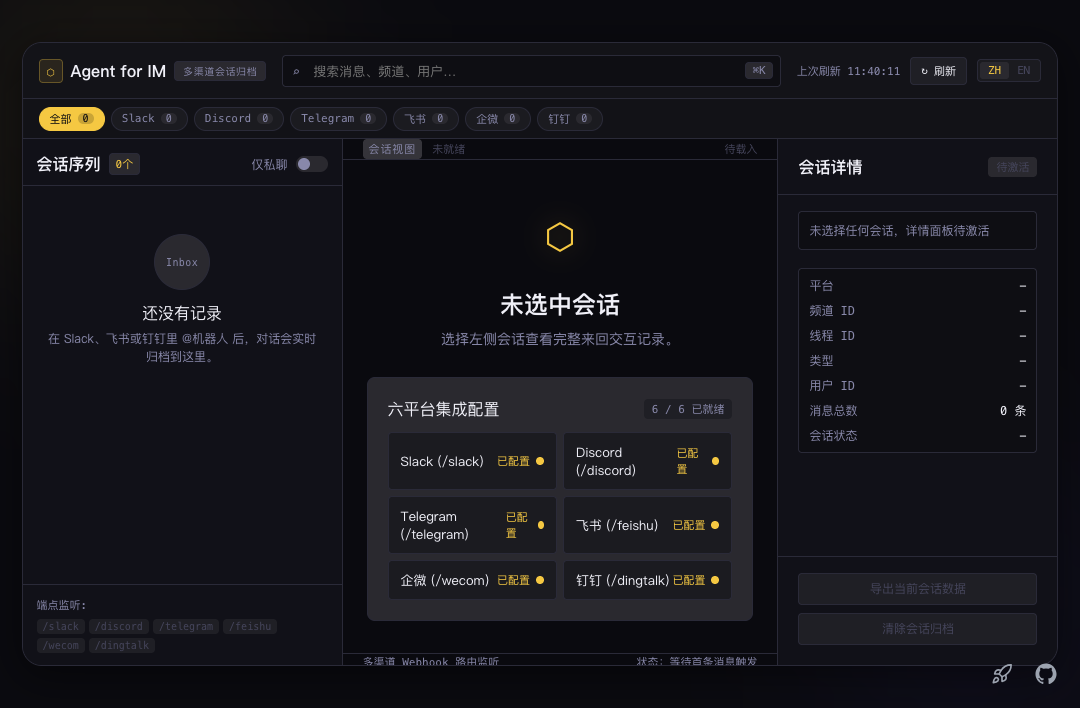
Agent for IM
A multi-platform IM agent on EdgeOne Makers. Use agent to answers Slack, Discord, Telegram, Feishu, WeCom, and DingTalk.
Framework: Chat SDK · Language: TypeScript
Supported platforms
| Platform | Route | Setup |
|---|---|---|
| Slack | POST /slack | Events API Request URL |
| Discord | POST /discord | Interactions Endpoint URL |
| Discord | POST /discord-gateway | Gateway listener for channel @mentions |
| Telegram | POST /telegram | Bot API setWebhook |
| Feishu | POST /feishu | Event Request URL |
| WeCom | GET / POST /wecom | Self-built app callback (1:1) |
| DingTalk | POST /dingtalk | Internal-app robot HTTP callback |
Discord channel messages need POST /discord-gateway, or npm run gateway locally. Do not run two listeners on one bot token.
Web inbox
The frontend is a read-only archive, not a live chat box. After each IM turn the agent writes channel metadata, the user message, and the reply to Makers context.store. The UI calls:
| Route | Role |
|---|---|
POST /inbox | List threads (filter by platform / DM / keyword) |
POST /history | Load one transcript |
POST /delete-conversation | Delete an archived thread |
New conversations appear after this version is deployed. Older IM threads were not indexed for the inbox.
Environment variables
Copy .env.example to .env. Only configure the platforms you use.
Always required
| Variable | Description |
|---|---|
AI_GATEWAY_API_KEY | Model gateway API key (Makers Models or any OpenAI-compatible provider). |
AI_GATEWAY_BASE_URL | Gateway base URL. Makers Models: https://ai-gateway.edgeone.link/v1. |
AI_GATEWAY_MODEL | Optional. Defaults to @makers/deepseek-v4-flash. |
AGENT_CALLBACK_SECRET | Shared secret for delivering IM replies. |
Slack
Request URL: https://<domain>/slack
| Variable | Description |
|---|---|
SLACK_SIGNING_SECRET | App Credentials → Signing Secret |
SLACK_BOT_TOKEN | Bot User OAuth Token (xoxb-). Reinstall the app after changing scopes. |
Required scopes: users:read, app_mentions:read, chat:write, plus channels/groups/im/mpim history and read. Subscribe to app_mention and/or message.channels, and message.im for DMs.
Discord
Interactions URL: https://<domain>/discord. Enable Message Content Intent.
| Variable | Description |
|---|---|
DISCORD_BOT_TOKEN | Bot token |
DISCORD_PUBLIC_KEY | Application public key (64-char hex) |
DISCORD_APPLICATION_ID | Application ID |
DISCORD_GATEWAY_SECRET | Bearer token for POST /discord-gateway (falls back to CRON_SECRET) |
Optional: DISCORD_MENTION_ROLE_IDS, DISCORD_RESPOND_TO_CHANNEL_IDS, DISCORD_WEBHOOK_URL (local gateway target).
Telegram
Register once (re-run if the domain changes):
curl -X POST "https://api.telegram.org/bot<TELEGRAM_BOT_TOKEN>/setWebhook" \
  -d url=https://<domain>/telegram \
  -d secret_token=<TELEGRAM_WEBHOOK_SECRET_TOKEN>
| Variable | Description |
|---|---|
TELEGRAM_BOT_TOKEN | From BotFather |
TELEGRAM_WEBHOOK_SECRET_TOKEN | Webhook secret token. /telegram refuses to run without it. |
In groups the bot only sees @mentions unless you disable privacy mode (/setprivacy).
Feishu
Event Request URL: https://<domain>/feishu (https, no trailing slash). Subscribe to im.message.receive_v1. Configure Encrypt Key and Verification Token under 事件与回调 → 加密策略.
| Variable | Description |
|---|---|
FEISHU_APP_ID | cli_… |
FEISHU_APP_SECRET | App secret |
FEISHU_ENCRYPT_KEY | Encrypt Key |
FEISHU_VERIFICATION_TOKEN | Verification Token |
WeCom (self-built app, 1:1)
接收消息服务器 URL: https://<domain>/wecom. Replies go through a hardcoded SCF with a static outbound IP. Add that IP under 企业可信IP.
| Variable | Description |
|---|---|
WECOM_CORP_ID | Corp ID |
WECOM_AGENT_ID | Agent ID |
WECOM_APP_SECRET | App secret |
WECOM_TOKEN | Callback token |
WECOM_ENCODING_AES_KEY | 43-char EncodingAESKey |
DingTalk (internal-app robot)
HTTP callback: https://<domain>/dingtalk
| Variable | Description |
|---|---|
DINGTALK_APP_KEY | App key |
DINGTALK_APP_SECRET | App secret |
DINGTALK_ROBOT_CODE | Robot code |
Local development
Prerequisites: Node.js ≥ 18 and the EdgeOne CLI (npm i -g edgeone).
npm install
cp .env.example .env
npm run dev:agents
- Web UI: Vite on the usual local port (read-only inbox for archived IM threads).
- Agent metrics:
http://localhost:8080/agent-metrics. - Discord Gateway locally (do not run this and
/discord-gatewayat the same time):
npm run gateway
Project structure
agent-for-im/
├── agents/                          # EdgeOne Makers Agents
│   ├── chat/index.ts               # POST /chat
│   ├── stop/index.ts               # POST /stop
│   ├── discord-gateway/index.ts    # POST /discord-gateway
│   └── _tools.ts                   # Sample tools
├── cloud-functions/                 # IM webhooks and conversation APIs
│   ├── slack/ · discord/ · telegram/ · feishu/ · wecom/ · dingtalk/
│   ├── chat-callback/
│   ├── history/ · inbox/ · delete-conversation/
│   └── _adapters/                  # One file per vendor
├── src/                             # React + Vite inbox (read-only archive)
├── scripts/discord-gateway.mjs
├── package.json
├── edgeone.json
└── .env.example
Files prefixed with _ are private modules — not public routes.
Adding another IM vendor
- Add the official
@chat-adapter/<name>package, or a community adapter such as@edgeone/chat-adapter-feishu. - Create
cloud-functions/_adapters/<name>.tsand register it in_adapters/index.ts. - Add
cloud-functions/<name>/index.tswithcreateVendorWebhook. - If the vendor has no HTTP events (Discord Gateway), add a long-lived listener in
agents/.
Resources
License
MIT.