


After-Sales Assistant
LangGraph-powered after-sales agent with summary-based knowledge routing and on-demand retrieval. No vector database needed. Supports order lookup, refund and exchange workflows with built-in knowledge management panel.

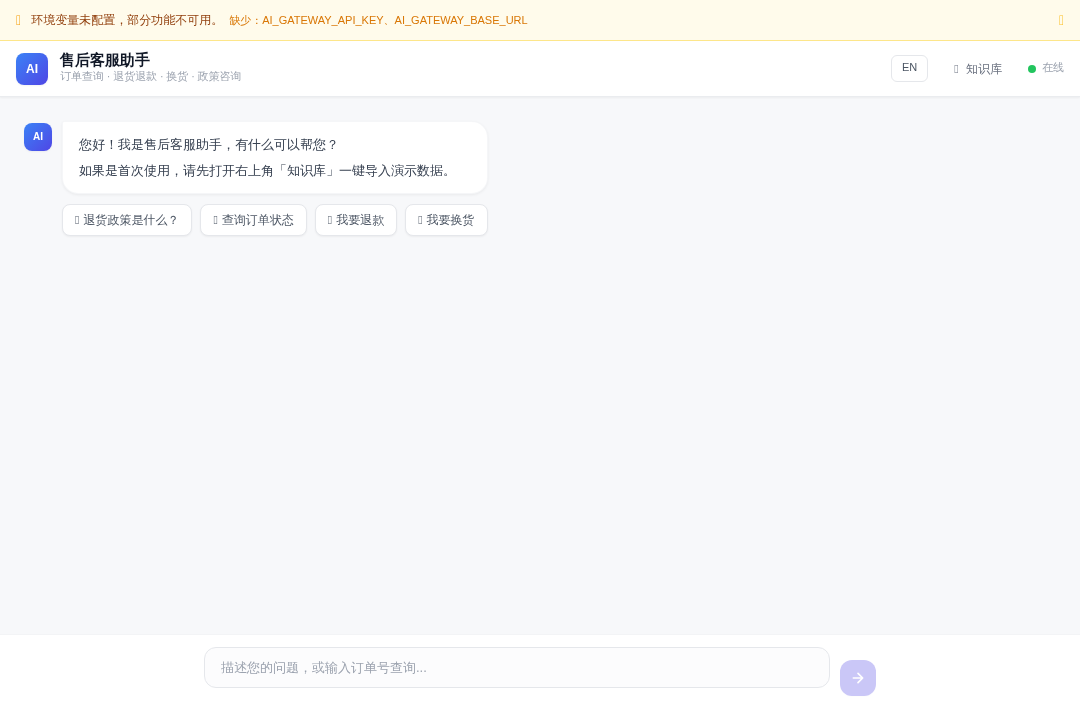
After-Sales Assistant
LangGraph-powered after-sales agent with summary-based knowledge routing and on-demand retrieval. Supports order lookup, refund and exchange workflows with a built-in knowledge management panel. Deployed on EdgeOne Makers.
Framework: LangGraph · Category: Chat · Language: TypeScript

Overview
This template implements a state-machine-driven customer service agent that recognizes user intent, routes to specialized handlers, and retrieves knowledge on demand. No vector database is required — FAQs and product knowledge are matched via summary-based routing and loaded only when needed.
- Intent Recognition — Classifies incoming messages into FAQ, order lookup, refund, exchange, or general chat.
- Knowledge Routing — Matches user queries to the most relevant knowledge base entry via summary similarity, then loads the full content on demand.
- Order Workflows — Dedicated handlers for order lookup, refund requests, and exchange requests with structured data validation.
- Knowledge Management Panel — A separate management endpoint for adding, updating, and organizing FAQ entries and product documents.
- State Persistence — Workflow state is persisted via
langgraphStoreso multi-turn interactions survive across requests. - Bilingual UI — Full Chinese / English interface with locale-aware AI output.
Environment Variables
| Variable | Required | Description |
|---|---|---|
AI_GATEWAY_API_KEY | Yes | Model gateway API key. Use your Makers Models API Key, or any OpenAI-compatible provider key. |
AI_GATEWAY_BASE_URL | Yes | Gateway base URL. For Makers Models, use https://ai-gateway.edgeone.link/v1. |
AI_GATEWAY_MODEL | No | Model ID. Defaults to @makers/deepseek-v4-flash. |
This template follows the OpenAI-compatible standard — point these at Makers Models or any compatible provider.
How to get AI_GATEWAY_API_KEY
- Open the Makers Console (https://edgeone.ai/makers/new?s_url=https://console.tencentcloud.com/edgeone/makers)
- Sign in and enable Makers
- Go to Makers → Models → API Key and create a key
- Copy it into
AI_GATEWAY_API_KEY
Built-in models are free within quota and great for validation. For production, bind your own paid provider key (BYOK).
Local Development
Prerequisites
- Node.js 18+
- EdgeOne CLI (
npm i -g edgeone)
npm install
cp .env.example .env
# Edit .env with your AI_GATEWAY_API_KEY and AI_GATEWAY_BASE_URL
edgeone makers dev
Open the local observability dashboard at http://localhost:8088/agent-metrics.
Project Structure
after-sales-assistant/
├── agents/
│   ├── chat/
│   │   └── index.ts        # POST /chat — main chat with intent routing
│   ├── manage/
│   │   └── index.ts        # POST /manage — knowledge base management
│   ├── upload/
│   │   └── index.ts        # POST /upload — document upload
│   ├── stop/
│   │   └── index.ts        # POST /stop — abort active run
│   ├── seed-demo/
│   │   └── index.ts        # POST /seed-demo — initialize demo data
│   ├── _graph/
│   │   ├── builder.ts      # LangGraph state machine builder
│   │   ├── state.ts        # State schema definition
│   │   ├── nodes.ts        # Intent handler nodes
│   │   └── edges.ts        # Conditional routing edges
│   ├── _data/              # Demo knowledge base data
│   ├── _i18n.ts            # Chinese / English translations
│   └── _shared.ts          # Model init, SSE helpers, logger
├── cloud-functions/
│   └── health/             # GET /health
├── app/                    # Next.js App Router frontend
└── edgeone.json            # EdgeOne deployment config
Files prefixed with _ are private modules — not exposed as public routes.
How It Works
Runtime Mode
Files under agents/ run in session mode: requests with the same conversation_id are sticky-routed to the same agent instance. This ensures LangGraph state and conversation context persist across follow-up messages.
End-to-End Workflow
- Message intake — The frontend POSTs
/chatwith the user message and locale via themakers-conversation-idheader. - State load — The handler loads any previously saved workflow state from
langgraphStorefor this conversation. - Intent recognition — The LangGraph
intent_recognitionnode classifies the message into one of:faq_search,lookup_order,request_refund,request_exchange, orgeneral_chat. - Conditional routing — The
routeByIntentedge dispatches to the appropriate handler node based on the classified intent. - Node execution:
- faq_search — Matches the query against knowledge base summaries, loads the best-matching full entry, and returns the answer.
- lookup_order — Queries order data and returns status, items, and tracking info.
- request_refund / request_exchange — Guides the user through the return/exchange flow with structured field collection.
- general_chat — Handles open-ended questions with the LLM directly.
- State save — The updated workflow state is persisted back to
langgraphStore. - SSE output — The response streams back as SSE events including
text_delta,tool_called, and UI card events for the frontend to render.
Key Routes & Parameters
/chat— Main customer service endpoint. Header:makers-conversation-id: <uuid>; Body:{ message, locale? }./manage— Knowledge base management (add/update/delete FAQ entries). Body:{ action, data }./upload— Document upload for knowledge base ingestion. Body:{ files[] }./seed-demo— Initializes demo FAQ and order data for first-time setup./stop— Aborts the active run. Body:{ conversation_id }./health— Liveness probe (lives incloud-functions/, not AI-related).conversation_idis generated client-side and forwarded via themakers-conversation-idheader; the runtime auto-binds it tocontext.conversation_id.
Timeouts
No custom agent timeout is configured; the platform default applies.
Resources
License
MIT