


EdgeOne Pages Plug-In Launches on Dify Marketplace
 Benjamin Carter
We are happy to announce that Tencent Cloud EdgeOne Pages plug-in is now live on Dify Marketplace. This powerful deployment tool allows users to instantly publish ZIP and HTML files as publicly accessible URLs, offering a seamless solution for rapid prototype verification and MVP testing.
Dify Marketplace: Accelerate AI Application Development
Dify's Marketplace has become an active ecosystem for open-source AI application development. The platform aggregates various plug-ins like models, tools, and Intelligent Agents to help users rapidly innovate and scale out AI solutions. The addition of EdgeOne Pages further meets the need for fast deployment and instant feedback.
| Comparison Dimension | Traditional Deployment | EdgeOne Pages |
| Deployment Time | 30 minutes - 2 hours | 10 seconds - 60 seconds |
| Infrastructure Configuration | Required | Zero Configuration |
| Global CDN Distribution | Additional cost required | Built-in |
| Version Management | Manual maintenance | Automatic historical version retention (ZIP file deployment) |
| Environment Isolation | Complex | Simple |
| Technical Barrier | High | Extremely Low |
EdgeOne Pages Plug-In Introduction: Rapid Iteration with Instant Deployment Solution
EdgeOne Pages Plug-In is designed for users who need quick idea verification. By supporting one-click deployment of ZIP packages and HTML files, it eliminates complex infrastructure configuration and allows users to rapidly review prototypes.
Core features:
Instant URL generation: Upload a ZIP file or HTML file and obtain a publicly accessible URL within seconds.
Rapid prototyping: Combine LLM for Vibe Coding (a development mode emphasizing quick writing and instant verification) - quickly build, deploy, and iterate.
- Seamless integration: Run directly in the Dify workflow with no need for external deployment tools.
- Edge delivery: Leverage EdgeOne's global CDN for fast content delivery.
- Environment support: Deployable to production environment and preview environment.
- Security authentication: Use EdgeOne API Token for secure deployment.
File size limit:
- Maximum ZIP file size: 50MB
- Maximum file size: 25MB
- Note: Optimize images and compress resources to get best performance.
Supported file types:
- HTML, CSS, JavaScript file
- Image format: JPG, PNG, GIF, SVG, WebP
- Font: WOFF, WOFF2, TTF, OTF
- Others: JSON, XML, TXT, MD
Quick Start
Quick guide to using the EdgeOne Pages Plug-In.
Obtaining an API Token
API Token is your identity credential on EdgeOne Pages, allowing you to operate Pages independent of the console.
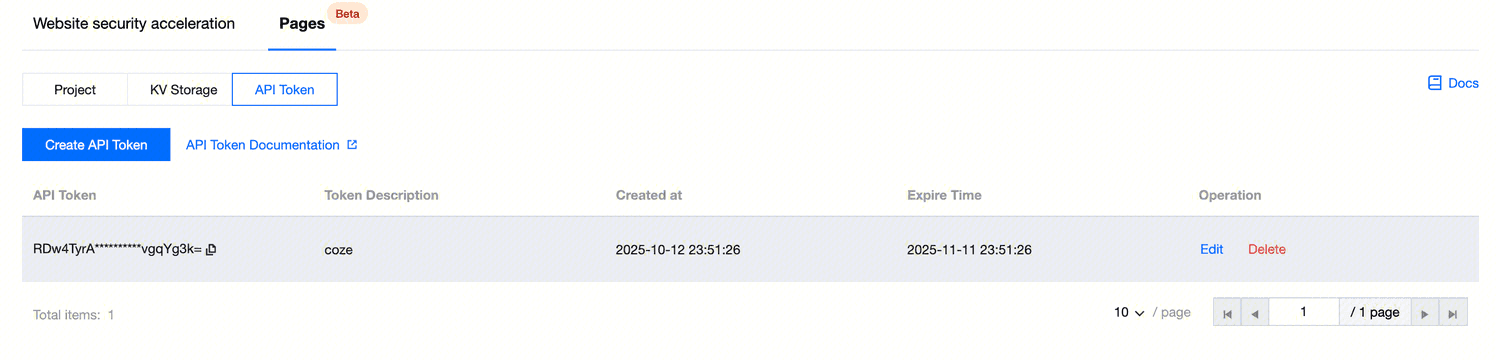
How to create an API Token:
- Visit the EdgeOne console and switch to "API Token".
- Click "Create API Token".
- Enter "Token description" to help you remember the purpose of the API Token.
- Select "expiration time" to ensure your information security.
- Click "Submit".
Installing EdgeOne Pages
Install the EdgeOne Pages plug-in on Dify Marketplace.
Create an application with plug-in support for easy deployment of complete Web projects and HTML files packaged as ZIP files to achieve quick content sharing. Provide API Token when deploying ZIP files.
Application Case: What You Can Build
EdgeOne Pages Plug-In unlocks powerful usage scenarios for rapid iteration:
Combine LLM for quick MVP verification: Use Dify to create workflow, perform Vibe Coding with the aid of LLM, and quickly generate accessible webpages and related page code.
To retain the current HTML content and continue development, you can enter EdgeOne Pages to upload generated files or code for version control and publishing.
Project version management: Build your project and compress the build content into a ZIP file. In the Dify application, select the EdgeOne Pages deploy ZIP file feature, upload the file to get the deployment successful link below. Before deployment, you can choose the production environment or testing environment. After deployment, you can view the link in the application or enter the Pages console to modify the domain name.
If you need to update an existing project, you can enter the project name to be updated in the API Key authorization configuration.
Note:
Live production environment: Update to the user access website, effective immediately.
Preview environment: Verify changes in an isolated environment without affecting official data.
About Dify
Dify offers a one-stop capability including Agentic workflow, RAG Pipeline, seamless integration and observability to facilitate the construction and deployment of production-level Agentic AI solutions.
By integrating EdgeOne Pages with Dify, we introduce enterprise-level deployment capability into quick prototype workflows, enabling developers to focus on innovation rather than infrastructure.